Showing posts with label PlayBook. Show all posts

Friday, December 9, 2011

Best Free Apps to Get Started with Your New BlackBerry PlayBook

For those new to the BlackBerry PlayBook, here are a few simple and free apps that I have been recommending to friends and family to go get started fast.  In fact, I'm giving away several PlayBooks for Christmas this year and this is what I am pre-loading on all of them....

Games... After all it's a "Play"Book

1. Super Air Hockey:  Play against a friend or against the PlayBook, this is a perfect example of  touchscreen simplicity.  Fun for all ages.

2. Fruits and Ninjas:  You got fruits.. You got Ninjas...  What else do you need?  In this game you slash through fruit with your finger making the world safe from dangerous fruit.

3. Doodle Blast:  This is a great puzzle game where you use virtual ink to complete the maze and capture the marbles.  You only have so much ink so you need to be strategic on where you draw the lines and let gravity do it's job.

4. Popcorn Rush: Touching the kernals will pop them into popcorn... The more you pop... the higher your score.  Just beware of the bombs!  Easy enough for all aged players.

5. Tile Breaker Free:  The best "breakout" type game on the PlayBook.  Simply move your finger to the spot you need your bat at and knock away those levels.

6. Assembler Mobile 2:  Great gravity based puzzle game.  Here's a hint...  Turn ON your "lock orientation" on your PlayBook to play this game on the higer levels. Otherwise the PlayBook will reorient itself while you are flipping it upside down.

7. Fly Squirrel Fly 2:  Pull back on your slingshot with a flying squirrel... and let it rip...  Silly fun as your squirrel goes flying through the levels picking up points and special abilities!

8. Bubble Birds:  The classic bubble popping game where you need to strategically put the coloured bubbles together and pop the series.  Clear them all and you are on to the next level.

9. Protect The Cheese:  Another puzzle game where you need to make sure the cheese doesn't hit the ground!  Fun for all ages.


Kids Stuff....  The Playbook Slices & Dices and can even babysit!

1. Coloring Book:  Simple colouring book for kids where they get to pick the pictures that need to be coloured and then simply select the shades and colour away.

2. MakeThemLaugh: A sound effects board so kids can make sound effects such as laughter, clapping, gasping, etc. Kids love to use the effects in their skits and plays.

3. Get Growing:  A TVO (TV Ontario) educational game that lets your kids plant and grow their own plants along with other activities.


Other Useful Apps

1. Scrapbook:  With pictures you've taken or downloaded you can use this native scrapbooking application to make scrapbook pages and share them with family and friends.

2. Piano:  Simple keyboard that you can also record your masterpieces.
This is perhaps the simplest of the keyboard like programs but definately my favourite.
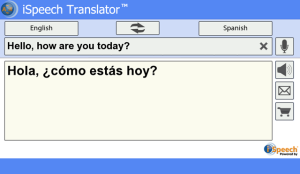
3. iSpeech Translator:  Handy dandy language translator for everyday use.  Not only will it translate voice, but you can also translate text!

4. Sketchbook:  Need to quickly draw? Tthen sketchbook is a great app that allows you to do just that.  You can use whiteboard, blackboard or even a picture as the backdrop.

5. Vevo:  Music lovers must-have!  All the major videos and interesting info on your fave artists are all on vevo. 

6. Score Mobile: Sports lovers must-have providing loads of information, stats, game tracking, live blogs and a ton of other  features.


Once you've mastered these and want to transform your PlayBook into a mobile multimedia powerhouse, check out my earlier post on the essential PlayBook power user apps.  But for now, these should help you get started.

Friday, July 29, 2011

Mindmaps: My Favourite Professional BlackBerry PlayBook App

The PlayBook for me is first and foremost a professional tool.  Sure I play the games, and often find sticky fingers on my PlayBook from the kids using it to play DoodleBlast or PopCorn Rush.  But what I love about my PlayBook is that I can show-up to meetings (which I have way too many of) and my hands are completely free.  I got my BlackBerry on my side and my PlayBook in my pant pocket or my Jacket Pocket.

When I pull out my PlayBook, I get a few glances but when I start to zip around on it in a meeting, that's when I notice people around me starting to look over my shoulder. 

A typical meeting, will have someone running through a deck that they e-mailed.  I am an impatient person so I tend to download the deck myself and flip through the slides as I see fit without waiting for the presenter to get to their point.  I do this while my responding and composing e-mails, doing my BBM and I've even had the audacity to browse the web for facts that will either dispute what the presenter is saying or support them.  AND I DO THIS ALL AT THE SAME TIME!  Why doesn't RIM do a better job demonstrating/marketing why "true" multi-tasking is so important?  

But back to the main point of post.  The other app which I use religiously is Mindmaps by Vandewalle Bram.  If you are familiar with mind mapping you will find this to be a great intuitive tool.  It's custom built for the PlayBook and it's beauty is it's simplicity.  I've tried all the other mindmapping apps out there for PlayBook but by far, I always come back to Mindmaps.    If you are not familiar with mindmapping, I think you will find with a little practice that you will be able to understand complex ideas, process large amounts of information, and even solve challenging problems with the use of mind maps which provide a synaptic understanding of concepts. 

If you are new to mindmapping, there are several sources to learn about it. Mind Mapping is a great compliment to the tablet, because, let's face it...  VIRTUAL KEYBOARDS SUCK compared to real keyboards but mind-mapping doesn't require you to do a ton of typing, you just need to jot down the key trigger word.

This application allows me to quickly relate concepts, and provides me the base tools to organize those concepts by shapes, icons and colours.  A simple "+" to add and "-" to erase quickly allows me to build branches and tap on my virtual keyboard.  I can pinch to zoom, pan across the map, and quickly find centre.  Once I am done, I can export this to FreeMind which I love on my PC and do further editing if required, or render it as a .JPG to quickly share with my colleagues. 

Something I am looking forward to trying is actually facilitating a session with a live mind-map hooked up to a big-screen monitor/projector all on my playbook.  It's great way to brainstorm with a bunch of people working on a single map.  Of course when I do that, I won't be be able to do all that other cool multi-tasking stuff...

So what are your favourite PlayBook Apps?

Saturday, July 23, 2011

Sonos Application for BlackBerry PlayBook

Do you have a Sonos Wireless HiFi Multi-Room System and would love to control it through your BlackBerry PlayBook?  Well that sounds like me.  I searched high and low for an app, but to this date there isn't any app for the PlayBook from either Sonos, RIM or any 3rd party developer. 

Luckily for you, I've figured out a way to actually control your Sonos system with your PlayBook!!!

The trick is to take advantage of the PlayBook's awesome web browser, leverage remote PC system, and use the Sonos Desktop Controller.  This way you will be able to basically control your PC running the Sonos Desktop Controller! Here are the steps to do this so you can control your Sonos system from your PlayBook

Step 1: Install the Sonos Desktop Controller on your PC or Mac.


Step 2: Install Remote PC Software & Complete Registration. 

I personally use LogMeIn, as I find the fidelity a bit better than other options. 


Step 3: Access your PC from your BlackBerry Browser by going to LogMeIn.com and log in. 

Now just type in your ID & Passwords, and you are all set!


Of course you can do a lot more than just use Sonos with LogMeIn but for me, this was what I was really looking for!  You will need to change the resolution a little bit and play with some of the settings to optimize it for your PlayBook, but it is pretty cool and now you can control your Sonos system from your PlayBook!

Now until RIM comes out with a PlayBook Android Player as they promised, this will get you by!

Hope you find this useful